¶ Screening Overview
Screening is where you decide which citations belong in your review. VADRR runs screening in two
stages — abstract (title/abstract) first, then
full-text — and uses
machine learning to show you the most likely-relevant citations
first.
¶ Key Concepts
¶ Decisions (Labels)
For every citation a reviewer records one of three decisions:
- Accept (Include) — green ✓
- Maybe — purple
- Reject (Exclude) — red ✗
A citation that hasn't been decided yet is Unlabeled.
¶ Screening Types
When you create a screening you choose how many reviewers must look at each citation:
- Perpetual (Single) — one reviewer's decision is enough. Reviewers keep drawing the next
citation from the pool until the pool is empty ("perpetual"). - Perpetual (Double) — two reviewers independently screen each citation; disagreements become
conflicts to resolve. This is the default and the most common for a
rigorous review. - Perpetual (Expert Needed) / Perpetual (Only Mixed With Expert) — double-screening modes
that route certain citations to expert reviewers. - Pilot — a calibration round where the whole team screens the same citations to align on
criteria.
Non-perpetual screenings (Pilot and the Fixed N Size variants) instead hand each reviewer a
fixed number of citations.
¶ Qualifications
A citation's overall standing at each stage (accepted/rejected) is its qualification. Privileged
decisions — for example an expert's call, or a conflict resolution — can override individual labels.
¶ The Abstract Screenings Page
Open your project ▸ Abstract Screenings. From here you can:
- Create New Screening — set up a screening and its rules (see below).
- Configure Reasons and Tags — manage the exclusion reasons and tags
reviewers can apply. - Machine Learning Results (Leaders) — open the ML results page.
- Force Training — a toggle to train the ML model on fewer than the usual 100 labels (it reverts
to off once training completes).
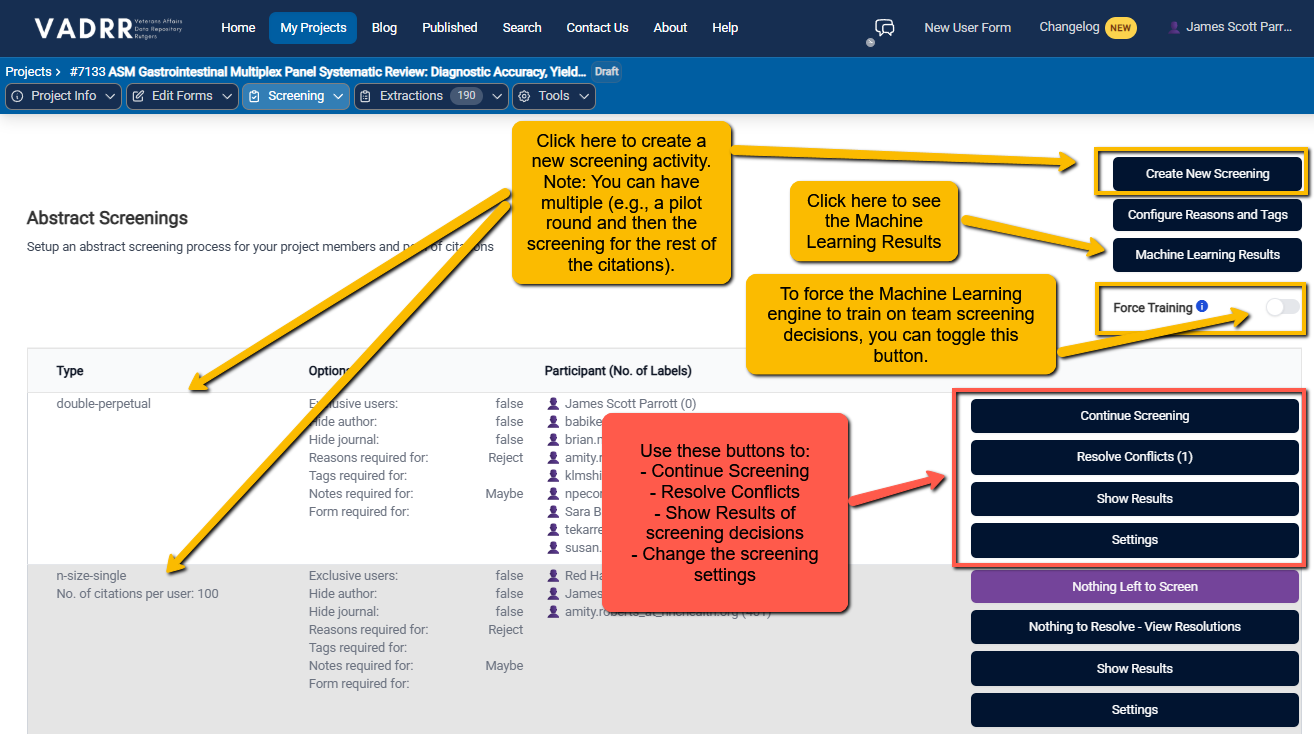
The Abstract Screenings page lists each screening with its type and rules.
The table shows each screening's Type, its Options (exclusive users, hide author/journal, and
which decisions require a reason/tag/note/form), and Participant (No. of Labels).
¶ Creating a Screening
Click Create New Screening and configure:
- Screening type (single/double perpetual, expert variants, pilot).
- Exclusive users — restrict the screening to specific people.
- Hide author / Hide journal — blind reviewers to reduce bias.
- Required for each decision — independently for Yes / Maybe / No, require a reason, a
tag, a note, and/or a screening form before that decision can be saved.
¶ Doing the Work
How you start depends on your role. Contributors land on a work-selection page and click
Screen Next Task (or Screen Pilot Round for a pilot) to be served the next citation. Leaders
and consolidators see the screening's results page with a Continue Screening button instead.
Either way the ML model decides the order. When you have no citations left to screen the button reads
Nothing Left to Screen, and the single-citation view shows "All citations screened." Past
decisions can be revisited via Your Labels (in the citation view) or My Labels (the per-screening
links on the work-selection page).