¶ Abstract (Title/Abstract) Screening
Abstract screening is the first pass: you read each citation's title, abstract, and keywords and
decide whether it's potentially relevant. VADRR serves citations one at a time, ordered by the
machine-learning model so the most promising appear first.
Who can do this: any reviewer assigned to the screening.
¶ Start Screening
- Open your project ▸ Abstract Screenings.
- Start screening:
- As a contributor, you land on a work-selection page — click Screen Next Task (or
Screen Pilot Round for a pilot round). - As a leader or consolidator, you land on the screenings list / a screening's results
page — click Continue Screening.
- As a contributor, you land on a work-selection page — click Screen Next Task (or
- The screening view opens with one citation's abstract, along with your projects rejection reasons, tags, and required questions (if any).
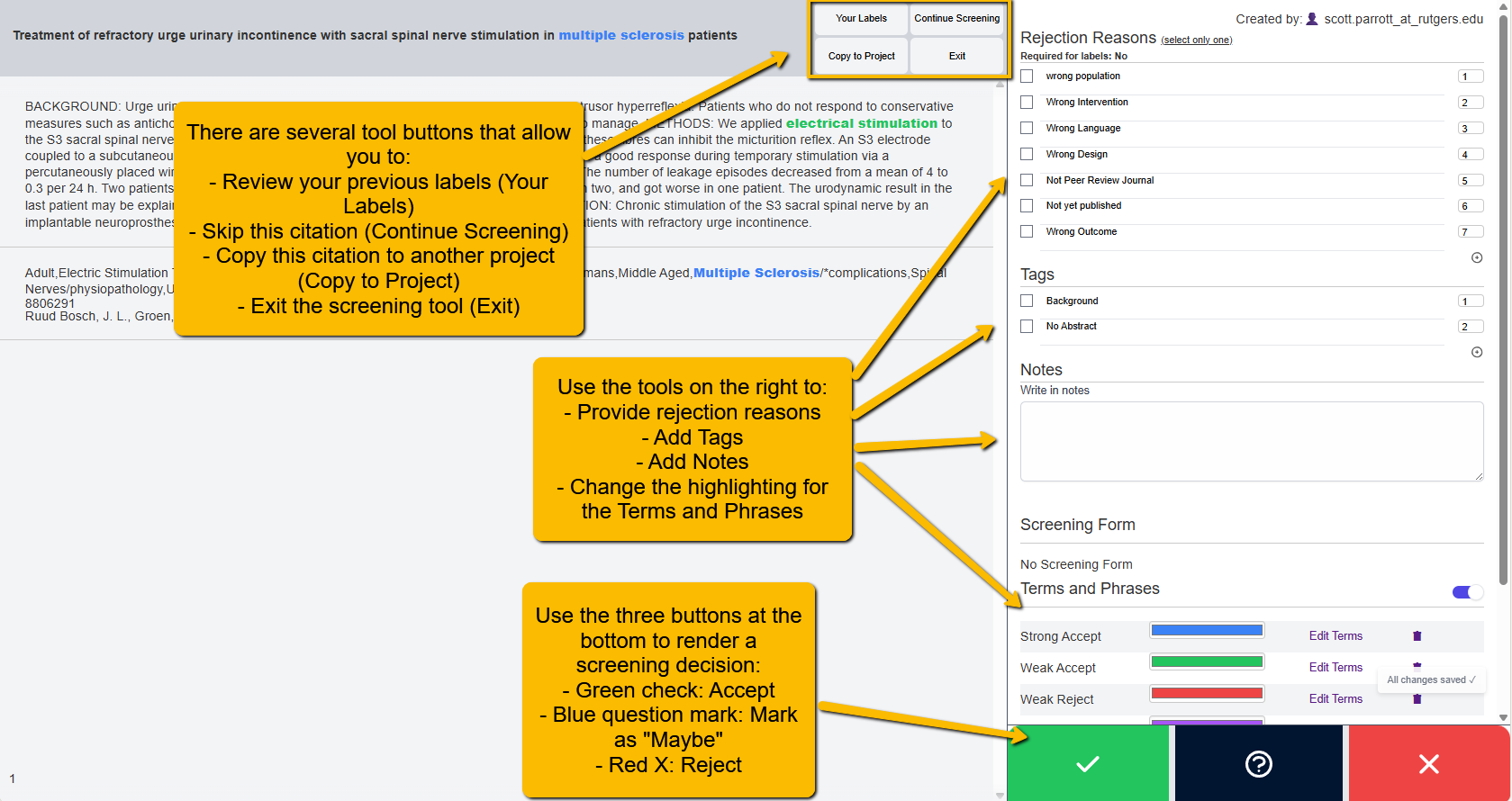
The citation title sits in the top bar; the abstract and keywords fill the reading pane; the
decision buttons are at the bottom and the reasoning menu is on the right.
¶ Make a Decision
At the bottom of the screen are three buttons:
| Button | Meaning | Label value |
|---|---|---|
| Green ✓ | Accept (include) | 1 |
| Purple | Maybe | 0 |
| Red ✗ | Reject (exclude) | -1 |
Click one to record your decision. A short confirmation (Accepted / Maybe / Rejected) appears,
and VADRR automatically advances to the next citation.
If the screening requires a reason, tag, note, or form for that decision, VADRR won't save it until
you provide it — you'll see "This label requires additional information. Please see 'Required for
labels'." and the missing item is flagged in red.
¶ The Reasoning Menu (Reasons, Tags, Notes)
On a wide screen the reasoning menu sits on the right; on a small screen tap the ≡ button to
open it. It has three sections:
- Rejection Reasons — tick the applicable reason(s). If the project limits you to one, you'll see
"(select only one)." If the project allows it, use + to add a new reason on the fly. - Tags — select any tags; + to add one (if allowed).
- Notes — free-text notes about this citation.
- Screening Form — these are optional questions and may be required when accepting a citation.
Each section shows "Required for labels: Yes / Maybe / No" when that information is mandatory for a
given decision.
¶ Reading Aids: Terms & Phrases (Word Weighting)
You can highlight important words to scan abstracts faster. Your project Leader may have already done so. These terms will help you identify easier whether the abstract fits your projects scope. To set ths up:
- Open Terms & Phrases and click any word in the title/abstract (or select a phrase) to give it a
weight and color. - Organize words into colored groups (rename them, set case-sensitivity, add default groups).
- Export your groups to a JSON file and import them into another screening to reuse a scheme.
Matching terms are then highlighted in color wherever they appear in the title, abstract, and
keywords.
¶ Other Controls (Top Bar)
- Your Labels — open the history panel to review or edit your past decisions.
- Continue Screening — load the next citation.
- Copy to Project — copy the current citation into one of your other projects (optionally with its
screening data). - Exit — leave the screening and return to the screening's page.
¶ When You Are Done
When the pool is exhausted you'll see "All citations screened" with a prompt to use Your Labels
to review or edit past decisions.
¶ Next Steps
- If this is a double screening, reconcile any conflicts.
- Move accepted citations on to full-text screening.
- Track everything in Citation lifecycle & KPIs.