¶ Exporting Project Data
VADRR can export your extraction data and screening decisions as Excel files, and also supports a
full project-data import/export workflow for moving or backing up a project.
Who can do this: the Export & Import Manager and study-data import are for Leader use only. The quick export modal is also available from the Tools menu.
¶ Two Ways to Export
Both live under the per-project Tools ▸ dropdown, in the Export & Import section:
- Export VADRR Data (Quick) — opens a small modal for the two most common exports.
- Export & Import Manager — the full page with export, import, and sharing tabs.
¶ Quick Export Modal (Export VADRR Data)
Choose Tools ▸ Export VADRR Data (Quick). The modal offers:
- Export Project Data — your extraction data as an XLSX file (the legacy
.xlsxformat). - Export Project Citation Labels — your citation screening decisions (labels) as XLSX.
Both run in the background: VADRR submits the request and notifies you by email when the file is
ready, so nothing downloads on the spot.
¶ Export & Import Manager
Choose Tools ▸ Export & Import Manager. It has four tabs:
EXPORT, IMPORT, EXTERNAL PROVIDERS, and LLM IMPORT.
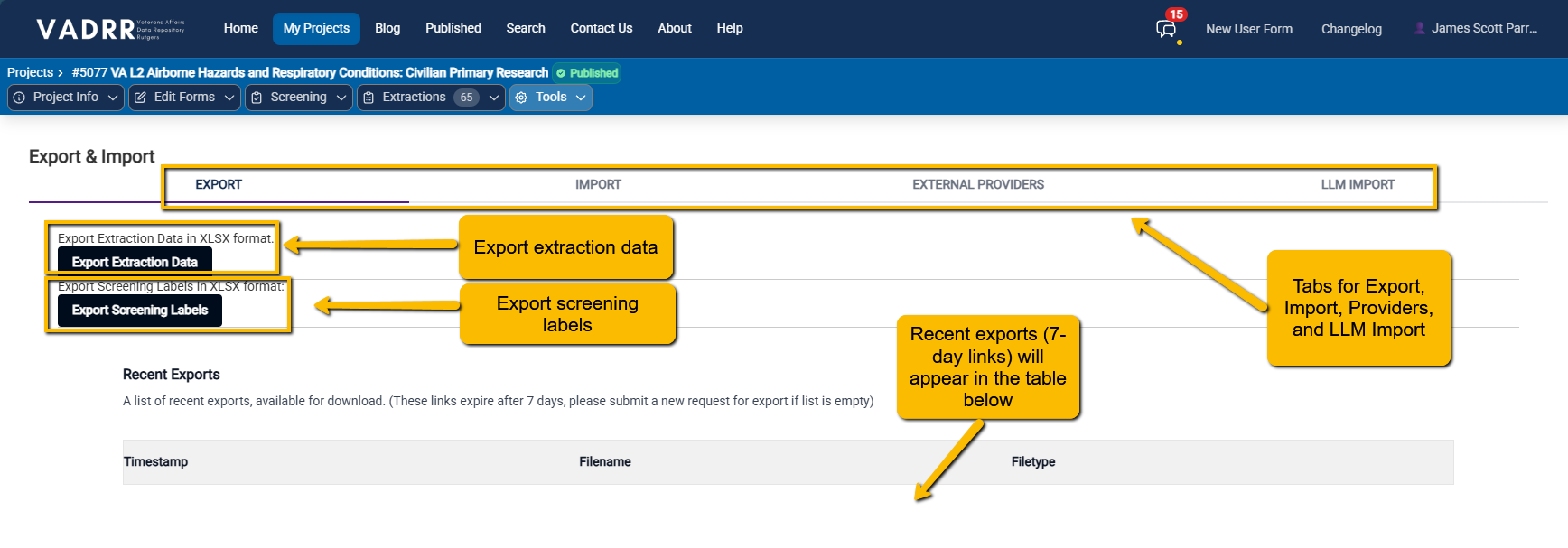
The EXPORT tab offers extraction-data and screening-label exports.
¶ EXPORT Tab
- Export Extraction Data — your extraction data as an XLSX file.
- Export Screening Labels — your screening decisions (labels) as XLSX.
Both are prepared in the background and emailed to you when ready (same as the quick modal). A
Recent Exports list on this tab shows finished files with Download links; those links
expire after 7 days, so submit a fresh request if the list is empty.
¶ Project-Data Workflow (IMPORT Tab)
The IMPORT tab is an Import Data Workflow with four numbered steps for moving structured data
in and out of a project — useful for bulk edits, backups, or migrating between projects:
- Step 1 — Export Assignments and Mappings Template. Click Get Export to download an XLSX
template of the project's users/assignments. (This one downloads immediately.) - Step 2 — Import Assignments and Mappings. Upload the filled-in template (XLSX) and click
Upload file. - Step 3 — Export Project Data. Click Get Export for the project's data as XLSX (legacy
format). - Step 4 — Import Project Data. Upload a project XLSX, pick an Import Strategy, and click
Upload file:- Additive only — existing data is preserved; data in the Excel file is added without changing
existing project data. (Selected by default.) - Destructive — the project's data is overwritten by the Excel import. (Use with care.)
- Additive only — existing data is preserved; data in the Excel file is added without changing
EXTERNAL PROVIDERS lets you share project data with external services; LLM IMPORT is covered
in LLM-assisted import & extraction.
¶ Related
- Citation lifecycle & KPIs to export screening data from the
screening side. - Publishing your project to make a project public instead of exporting
raw data, and SR-360 to build its interactive summary.