¶ LLM-Assisted Import & Extraction
VADRR can hand your extraction form to a large-language-model (LLM) assistant, let it pre-fill answers from a study, and import the result — turning a blank extraction into a reviewable draft.
Who can do this: Leaders (LLM import lives on the Export & Import page).
An LLM can make mistakes — always review an LLM-filled extraction before accepting it.
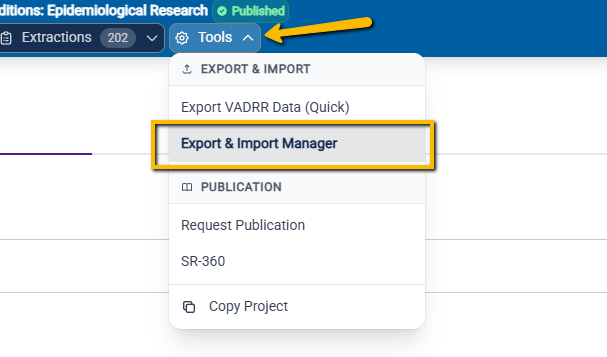
To access the LLM Import and Extraction tool, click on Tools in the top navigation bar, and select Export & Import Manager.
¶ The Three Steps
¶ 1. Download the LLM Package
Open the project's Export & Import page and choose the LLM IMPORT tab, then
Download LLM Package. The package is a JSON description of your project's extraction form — all its
questions, answer options, and structure — so the model knows exactly what to fill in.
¶ 2. Use it with an AI
Give the LLM (e.g. ChatGPT, Claude) both the LLM Package and the study (e.g. its PDF/full
text), and ask it to return its answers as a FHIR QuestionnaireResponse JSON file that matches the
package.
¶ 3. Upload the Response
Back on the LLM IMPORT tab, choose where the data should go, attach the model's JSON, and import.
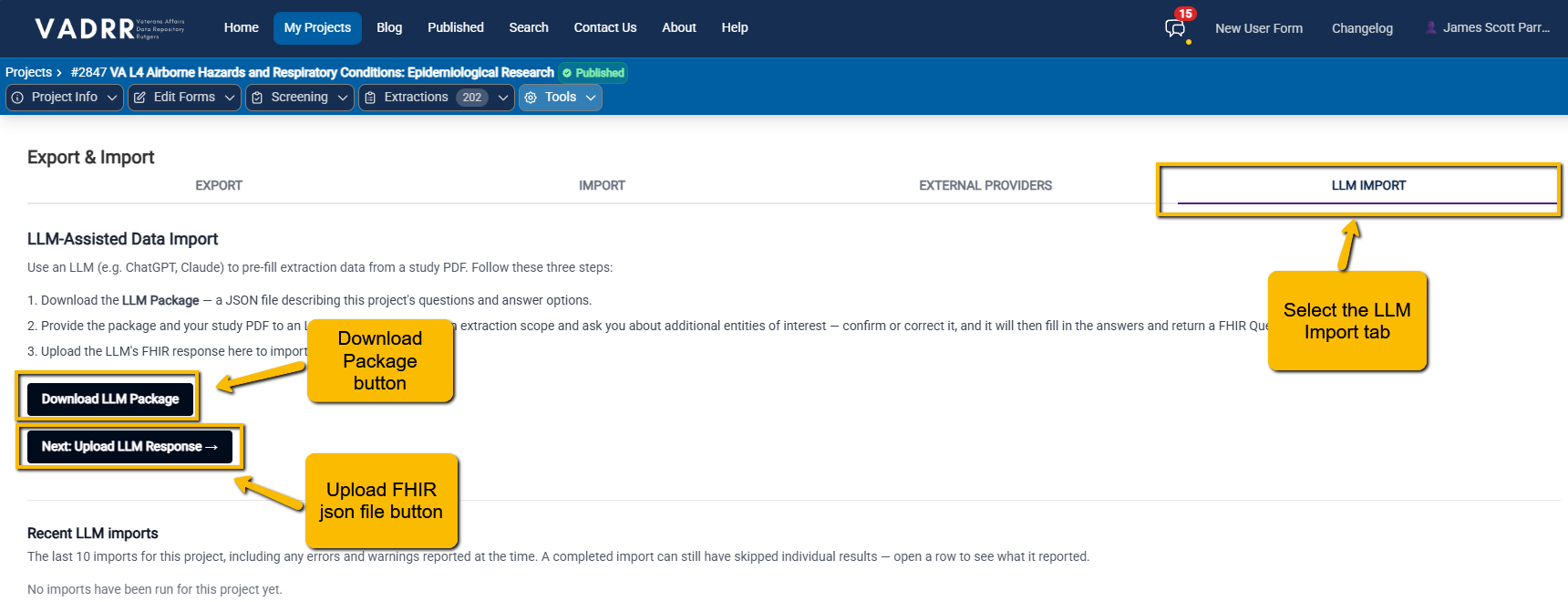
The LLM IMPORT tab: download the package, then upload the model's FHIR response to a target.
You pick one of three targets:
- Use an existing extraction — apply the answers to an extraction you already have (auto-detect, or pick a specific one).
- Existing citation + user — create a new extraction for an existing citation, assigned to a
chosen project member (or a new user you search for and give a role, default Contributor). - New citation + user — create the citation too. Enter a PMID and fetch from PubMed to
auto-fill the citation, or type the details (title, authors, abstract, DOI, journal, pages, etc.), then assign it to a user.
Note: It may be best to create a dummy member of the team that designates the assigned user as a LLM. For instance, "Claude_Anthropic" may be the name of your dummy team member. This will help with easily distinguishing a human extracted task from an LLM extracted task.
¶ After Import
VADRR shows a report summarizing what was created, updated, and any errors or
warnings. The new/updated extraction then behaves like any other — open it in
data extraction, correct anything the model got wrong, and submit it
for review.
The same LLM IMPORT mechanism can create the citation and its extraction in one step, which makes > it a quick way to bring in a single study end-to-end.