¶ SR-360: An Interactive Review Summary
SR-360 is VADRR's tool for sharing a systematic review with the world. It lets you assemble a
review's summary information into an interactive, modular page that visitors to VADRR can explore.
SR-360 will provide you a platform for sharing your review's summary digitally and interactively with the world!
Who can do this: project members. SR-360 is reached from the project's Tools ▸ Publication > SR-360 menu.
SR-360 vs. publishing the project. Building an SR-360 item is not the same as publishing your project. The SR-360 Summary only becomes publicly reachable once the project itself is published and approved — see Publishing your project. The two share an approval queue but are separate records.
¶ What You Can Include
An SR-360 record can bring together:
- Meta Data — funding sources, authors, stakeholders.
- Documentation — executive summary, protocol, and other documents.
- PICODTS eligibility — the review's Population, Interventions, Comparators,
Outcomes, study Designs, Timing, and Settings. - Search Strategies & Results of Screening — databases searched, the
PRISMA diagram, etc. - Risk of Bias & Overall Summary of Evidence.
- Results for Individual Outcomes — narrative results, evidence tables, pairwise meta-analyses,
network meta-analyses, and meta-regression results.
¶ Build an SR-360 Item
- From the project, open Tools ▸ Publication ▸ SR-360 and click Create SR-360 Item.
- In the dialog, point the item at a Systematic Review Report — either Upload PDF or Select from existing reports — then click Create.
- Open the item with Work and fill in its sections. The builder organizes the review into tabs
such as Title, Funding Sources, and Dates; Authors and Stakeholders; URL Links; Purpose,
Analytic Framework, and Key Questions; PICODTS; Key Question Mapping; Search Strategy and
Results of Screening; Risk of Bias and Overall Summary of Evidence; and Results for Individual Outcomes. (A link near the top, "To try the New SR-360 in alpha", opts you into an alpha of a redesigned builder.) - Back on the SR-360 list, each item shows its Progress: a meter whose tooltip lists Incomplete Sections, or Completed when every required field is filled. Use View to preview the item and Work to keep editing.
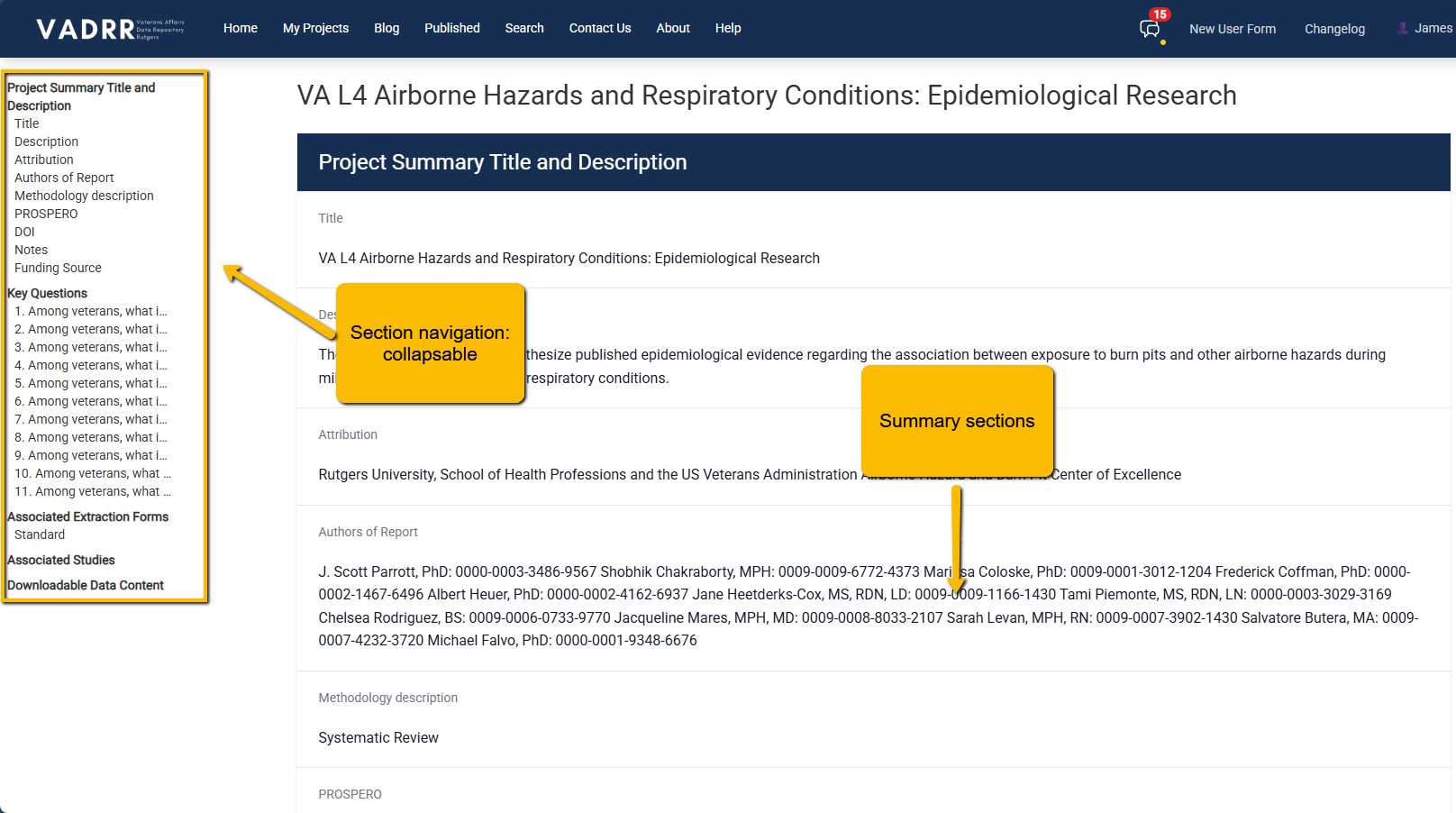
A published SR-360 — the public, interactive summary of a review (this example is project 683).
¶ Publish (With Approval)
- When every required section is complete, a Publish link appears in that item's row on the
SR-360 list. Click it to submit the item for publication.- If something required is still missing, the Publish label opens a dialog listing the tabs with missing fields instead of submitting, so you can finish them first.
- Publishing submits a request that an admin reviews — the row then shows "Request under
review," and "Published" once approved. - The approved SR-360 Summary becomes publicly reachable through the project's public page (as a
"View SR360 Summary →" link), which means the project must also be published for visitors
to open it. See Publishing your project.
¶ Manage Items
Each SR-360 item can be viewed, worked on (edited), or destroyed from the SR-360 list.
¶ Related
- Publishing your project — make the project (and its SR-360 Summary)
public. - Build the underlying PRISMA diagram.
- Export the underlying data for offline analysis.