¶ Publishing Your Project
Publishing makes a finished project publicly viewable on VADRR. You send a request, an administrator approves it, and the project then appears on the Published Projects page where anyone can read its summary, extraction forms, and data.
Who can do this: project members — in practice the project Leader finalizes and requests publication. Approval is done by a VADRR administrator, not by you.
Publishing the project is separate from building an SR-360 summary,though they share the same approval queue. If you have an SR-360 item, publishing the project is what makes its "View SR360 Summary →" link reachable to visitors.
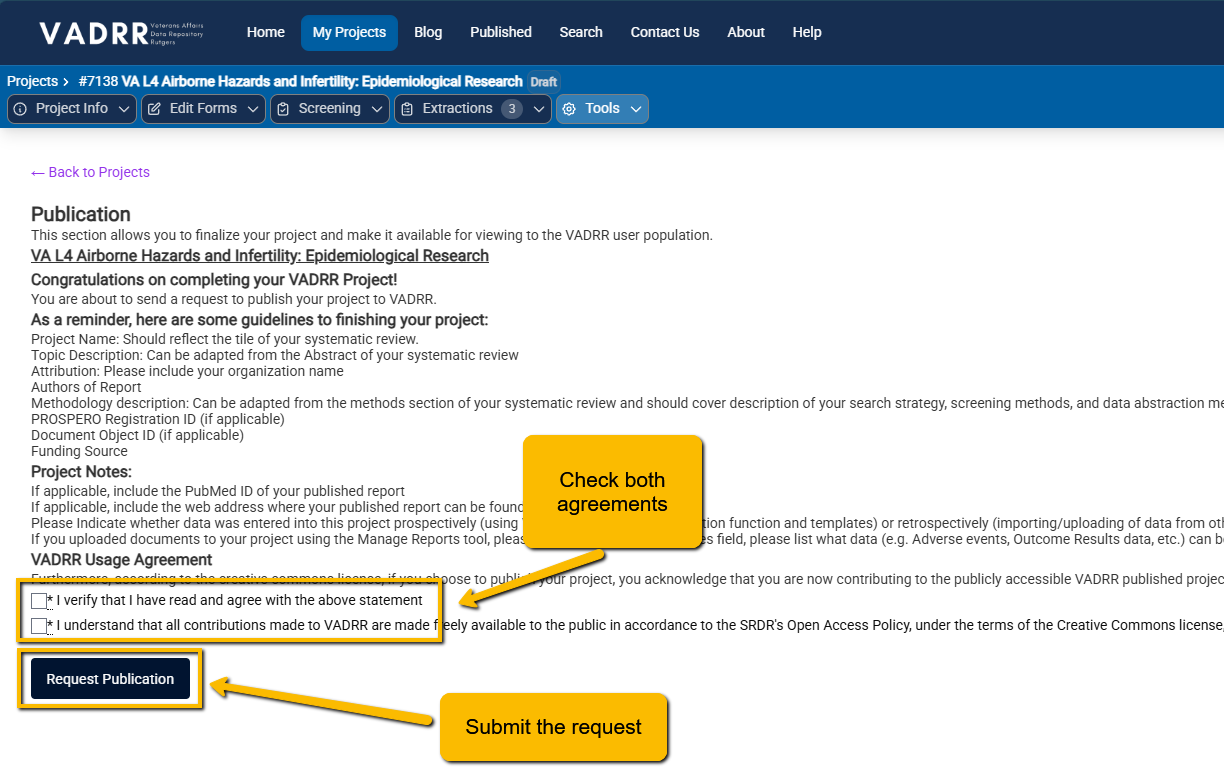
The Request Publication page: review the finishing guidelines, tick both agreements, then click Request Publication.
¶ Request Publication
- From the project, open Tools ▸ Publication ▸ Request Publication.
- Read the page. It walks through guidelines for finishing your project (Project Name, Topic
Description, Attribution, Authors, Methodology description, registration IDs, Funding Source, and
Project Notes) and shows the VADRR Usage Agreement. - Tick the two required agreements — that you have read the guidance, and that contributions are made
freely available under the Creative Commons Attribution-Share Alike 4.0 (CC BY-SA 4.0) license. - Click Request Publication and confirm.
If any required fields are still missing, VADRR does not submit the request; it shows which fields
to fill in first. Otherwise you'll see:
"Success! Your request is received. We will inform you once the record is public."
VADRR emails both you and the administrators, and the request now waits for approval.
¶ Approval
A VADRR administrator reviews pending requests and clicks Approve. You don't approve your own
project. Once approved, the project is public and the administrator (and you) are notified.
Until a request is approved it is only pending — the project is not yet visible to other users.
¶ What Becomes Public
Once approved, the project is reachable at its public page, which shows, depending on what the project contains:
- the Project Summary title and description,
- a SR360 Summary link (if the project has an SR-360 item),
- the project's extraction forms and extractions, and
- the project's citations.
¶ Where it Appears
Approved projects are listed on the Published Projects page under "Recently Published Projects," newest first. Each entry shows when it was published, its name, and citation/key-question/extraction counts, with a READ MORE ↗ link to the public page. There's also a Search for more Projects link to browse beyond the recent list.
¶ Cancel or Un-Publish
- Before approval — you can withdraw your own request. Open Tools ▸ Publication ▸ Request
Publication again (it now reads "This publication is under review") and click Cancel
Publication Request, or use Cancel in the pending-publications list. VADRR confirms with
"Success! Your publication request was cancelled." - After approval — only an administrator can take a project back down, by rescinding the
approval. Removing the approval returns the project to a pending (non-public) state.
¶ Related
- SR-360 — build the interactive summary that appears on the public page.
- PRISMA flow diagram — the screening flow diagram for your review.
- Exporting project data — share or back up data instead of publishing.