¶ Team Members & Roles
Systematic reviews are team efforts. Open a project and choose Member(s) & Role(s)
(/projects/<id>/edit?page=members_and_roles) to add collaborators and assign what each can do.
Who can do this: only the project Leader can add/remove members or change roles. Others
can view the member list.
¶ Add a Team Member
- On the Member(s) & Role(s) screen, click add another user to project.
- In the new row, use the User field to search for and select an existing VADRR user (the list
matches on their handle/name). The person must already have a VADRR account — there is no
invite-by-email here, so a collaborator who isn't in the list needs an administrator to
create an account for them first. - Tick one or more role checkboxes — Leader, Consolidator, Contributor, Auditor
(a person can hold more than one role). - Optionally flip the Expertise toggle and fill in Interest Areas,
Additional Roles & Responsibilities, and Availability Notes. - Click Save changes.
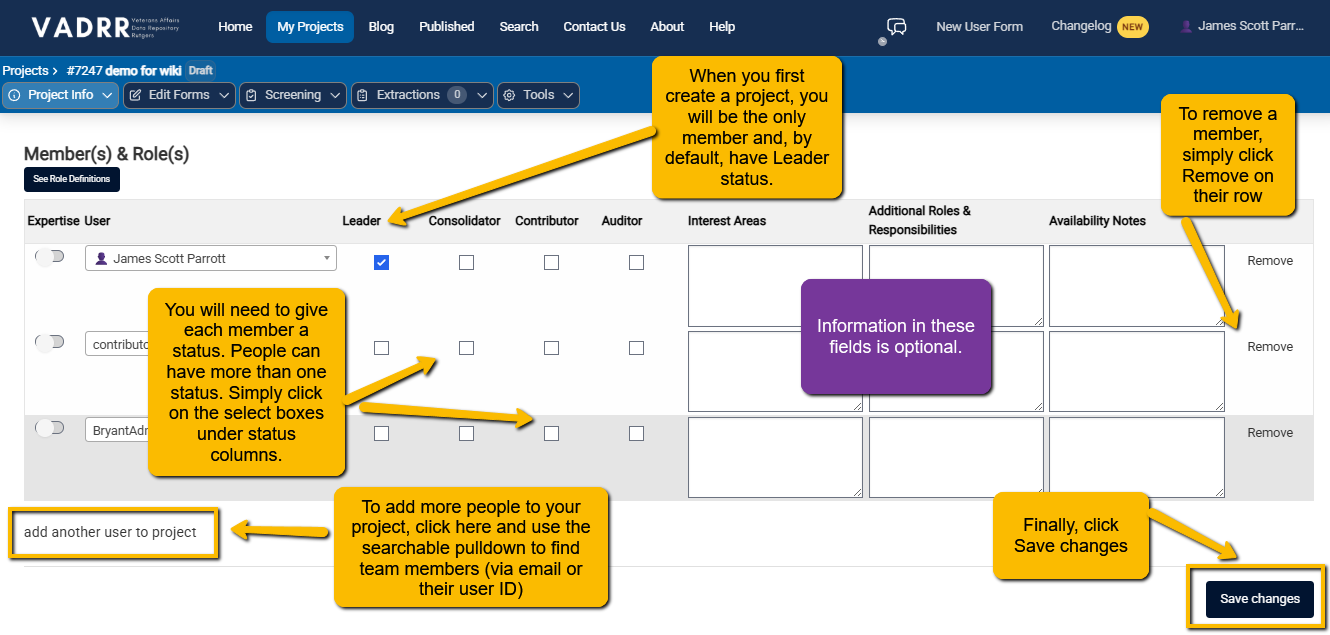
Each row is one team member; the columns are the assignable roles plus optional notes.
To remove someone, a Leader uses the delete control at the end of their row.
¶ The Four Roles
VADRR has four roles: Leader, Consolidator, Contributor, and Auditor. Click
See Role Definitions on this screen to open the full matrix in-app.
¶ How to Think About the Roles
- Leader — full control of the project: settings, the form builder, importing/exporting,
publication, plus everything the other roles can do. - Consolidator — works across reviewers: extracts data, and uniquely can use the
Comparison Tool and consolidate
multiple extractions into one. - Contributor — does the day-to-day work: manages citations and creates/edits extractions, but
can't consolidate, import study data, or export. - Auditor — read-only oversight: can view information, citations, and extractions but cannot
change anything.
¶ Full Details on What Each Role Can Do:
| Ability | Leader | Consolidator | Contributor | Auditor |
|---|---|---|---|---|
| View Project Info, Key Questions, Members & Roles | ✓ | ✓ | ✓ | ✓ |
| Edit Project Info, Key Questions, Members & Roles | ✓ | |||
| View the Extraction Form Builder | ✓ | |||
| Edit the Extraction Form Builder | ✓ | |||
| View citations | ✓ | ✓ | ✓ | ✓ |
| Add / create / edit citations | ✓ | ✓ | ||
| View extractions | ✓ | ✓ | ✓ | ✓ |
| Import / add / create extractions | ✓ | ✓ | ✓ | |
| Edit extractions | ✓ | ✓ | ✓ | |
| Use the Comparison Tool & consolidate extractions | ✓ | ✓ | ||
| View & edit the list of consolidated extractions | ✓ | ✓ | ||
| Import study data into the project | ✓ | |||
| Export data from the project | ✓ | |||
| Request publication of the project | ✓ |