¶ Starting a new project
A project is one systematic review. Creating a project makes you its Leader and sets up a
default extraction form so you can start working immediately.
Who can do this: any signed-in user can create a project; you automatically become its Leader, and you can add more Leaders and team members after creation.
¶ Create a project
- From your projects list (
/projects), click New Project (or go to/projects/new). - On the "Start a new Project" form, fill in:
- Name (required) — the project name cannot be blank.
- Description — a short summary of the review (optional, free text).
- Choose a create type from the dropdown:
- Create an empty project — the default choice; starts you with a default extraction form.
- Create project from a Distiller SR .csv export — migrates citations/data from DistillerSR.
Selecting this reveals file-upload fields (a Distiller References File and one or more
Section files) right on the form (see
Import from a DistillerSR export).
- Click Create Project. (When the create type is the DistillerSR import, you'll be asked to
confirm before the project is created.)
Team members aren't added on this form. Once the project exists you invite collaborators from
Team members & roles.
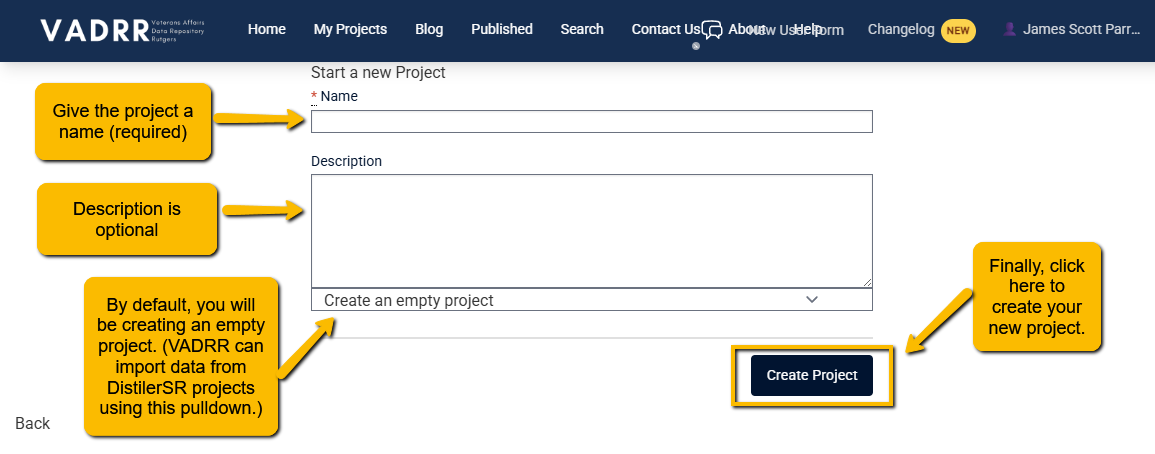
Creating a project. The create-type dropdown lets you start empty or seed from a DistillerSR export.
You'll be taken into the project, where you can edit its details, define key questions, import
citations, and invite collaborators.
¶ What gets created automatically
- A default extraction form (unless you started from a special import type).
- You are added as the project Leader.
¶ Copy an existing project
Instead of starting from scratch, a Leader can duplicate a project they already lead.
- From your projects list, open the project's Tools dropdown and choose Copy Project.
- In the Copy Project dialog, you may select which components to include:
- Include Citations — copies all citations from the source project.
- Include Screening Data (only available when Citations is ticked) — also copies screening
status, decisions, tags, reasons, and notes.
- Include Screening Data (only available when Citations is ticked) — also copies screening
- Include Extraction Forms — copies the extraction form templates and structure.
- Include Extractions — copies all extraction data and records.
- Include Citations — copies all citations from the source project.
- Click Copy Project.
This process runs in the background in VADRR. You'll see a progress indicator and receive an email when the copy
is complete; the new project then appears in your projects list.
Who can do this: only a project Leader sees Copy Project. You become the Leader of the
new copy. Project members are not carried over — re-invite collaborators from
Team members & roles.