¶ Project Status Dashboard
The status dashboard gives a live read on project progress: who's doing what, how long
extractions are taking, and what work is still outstanding.
Who can see this: any member of the project (any role). The view always shows the whole
team's activity, which you can then narrow to one person with the By User filter.
¶ Open It
Open the project's Project Dashboard — the Project Dashboard item in the project menu (it's
also where a project's name/title link takes you). That page opens on two tabs; this dashboard is the
Extraction Overview tab. (The other tab, Citation Lifecycle Management, is documented under
Citation lifecycle & KPIs.)
Heads up: the menu item labelled Project Dashboard opens the page described here. There is
no separate "Status" link to click — the content lives behind the Extraction Overview tab (served
from/projects/<id>/status).
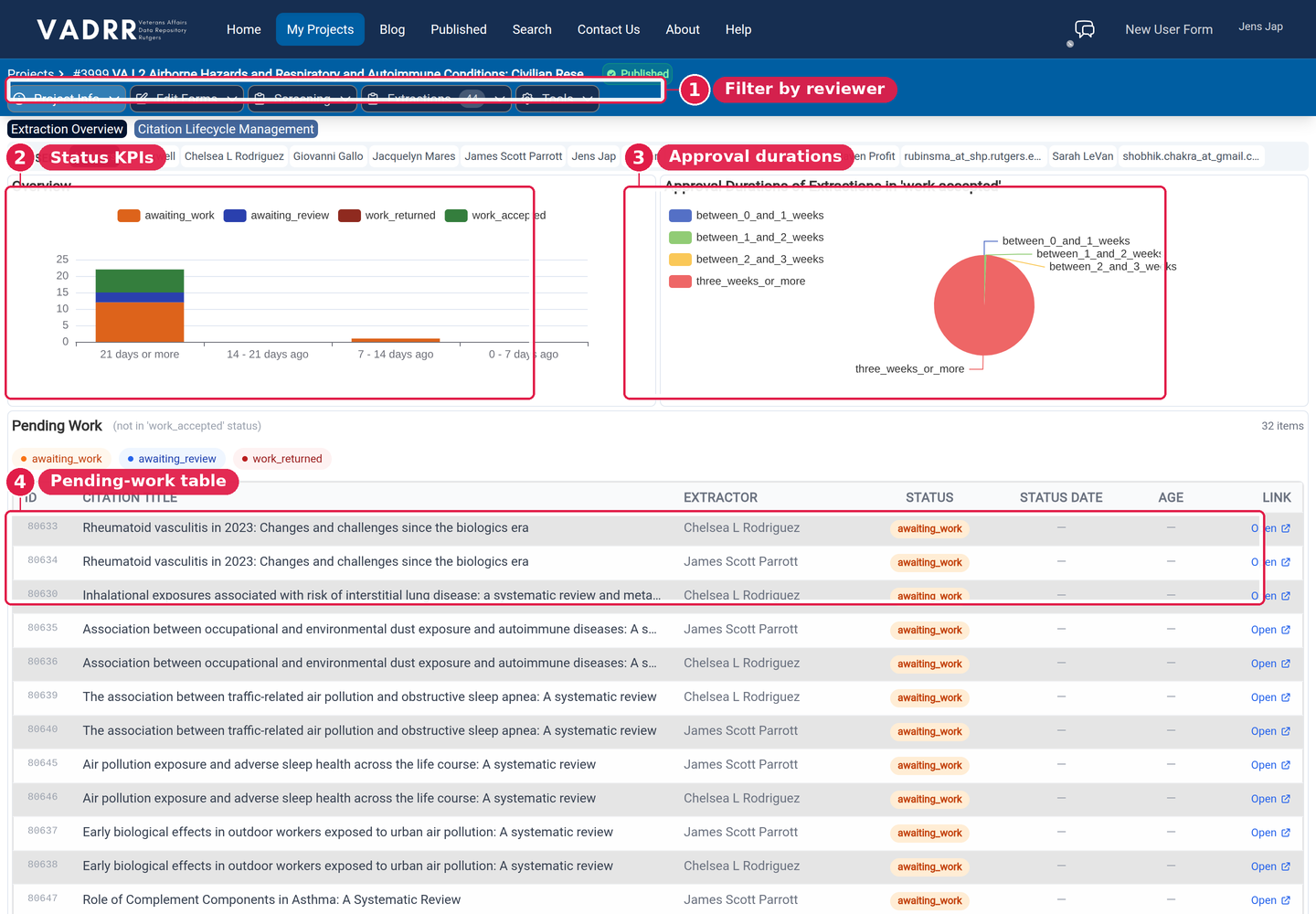
Filter by user, then read the activity charts and the pending-work queue.
¶ By User Filter
At the top, switch between All Users and any individual team member. The charts and tables below
update to that person, so you can review either the whole team or one reviewer.
¶ Charts
- Overview — a stacked bar of extraction-status changes over time, bucketed into four windows
(21 days or more, 14–21 days ago, 7–14 days ago, 0–7 days ago). Each colour is a status the
extractions most recently moved into (awaiting_work,awaiting_review,work_returned,
work_accepted), so you can see recent extraction throughput at a glance. - Approval Durations of Extractions in 'work accepted' — a pie chart of how long approved
extractions took to reachwork_accepted(under 1 week, 1–2 weeks, 2–3 weeks, 3+ weeks), so you
can spot bottlenecks.
¶ Pending Work
A table of everything not yet in work_accepted — i.e. work still in flight. Toggle the status
chips to filter:
- awaiting_work (orange) — not yet submitted
- awaiting_review (blue) — submitted, awaiting a reviewer
- work_returned (red) — sent back for changes
The table has seven columns:
- ID — the extraction's ID.
- Citation Title — the citation being extracted.
- Extractor — the assigned reviewer (shows System if none).
- Status —
awaiting_work,awaiting_review, orwork_returned. - Status Date — when the extraction entered its current status.
- Age — how long it's been in that status (e.g. 3 days).
- Link — an Open link to the extraction's work page (opens in a new tab).
A running count of matching items is shown next to the heading. When nothing matches your filters
you'll see "No pending work matching current filters."
¶ Related
- Extracting data explains the status workflow these numbers track.
- Citation lifecycle & KPIs for per-citation status.
- Machine Learning Results for screening progress and recall.