¶ Team Messaging & Chat
VADRR has a built-in unified inbox so your team can discuss the review without leaving the app —
in dedicated chat rooms or in threads attached to a specific project, citation, or extraction.
¶ Open Your Inbox
Click the Messages envelope icon in the top bar (any page). It opens the Messages &
Conversations modal, which is your unified inbox. The envelope shows a red badge with your unread
count and a yellow dot when you have unread mentions.
The left sidebar lets you search and filter conversations by context:
- All
- 💬 Rooms — standalone chat rooms
- 📁 Projects — discussion attached to a project
- 📄 Citations — discussion attached to a citation
- 🔍 Extractions — discussion attached to an extraction
A status filter narrows the list further — All Status, Unread, or @Mentions — and a
time filter limits it to recent activity (All Time / 24h / 3 Days / 1 Week).
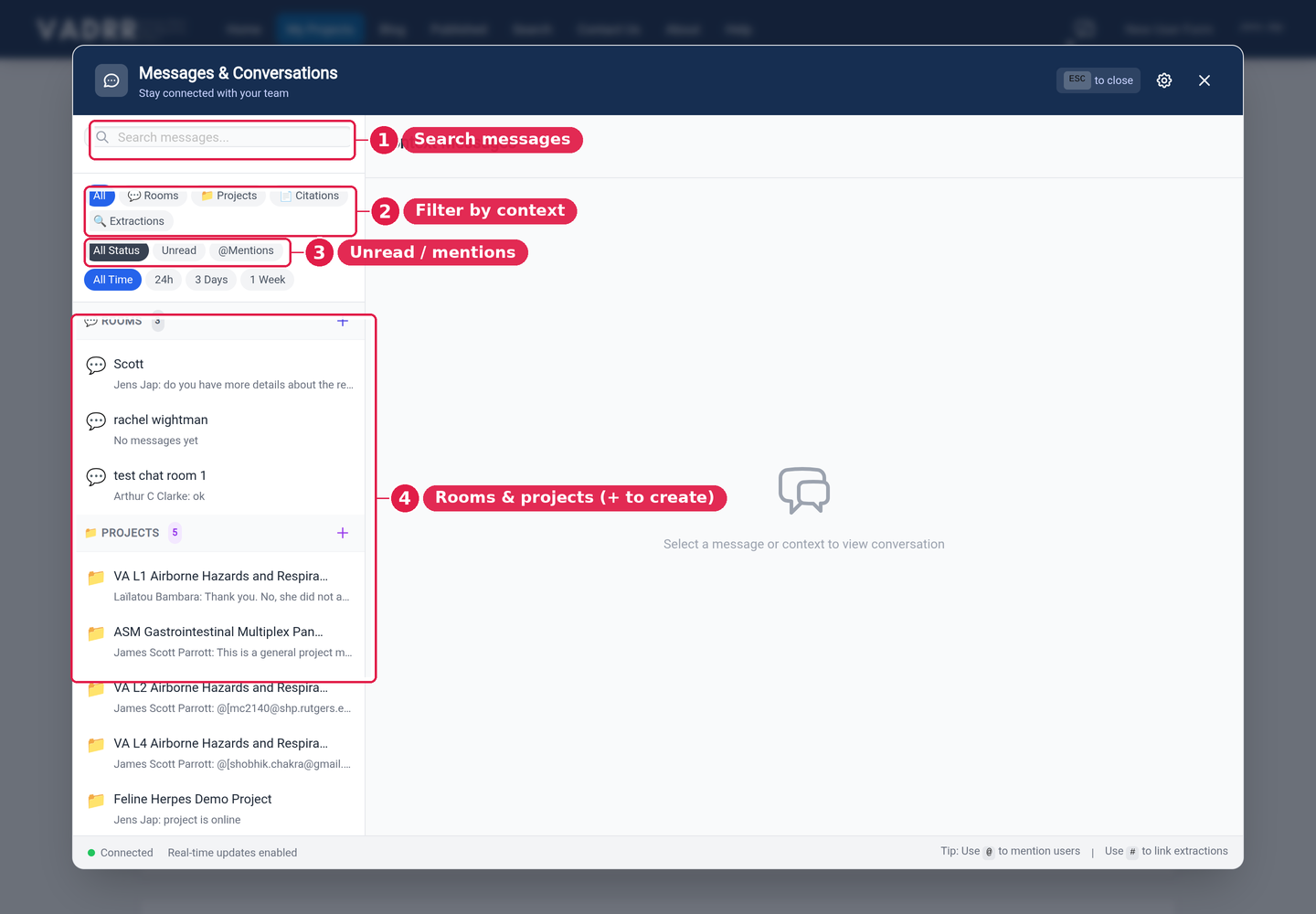
One inbox for rooms and for project/citation/extraction threads.
¶ Chat Rooms
Create chat rooms for ongoing team conversation. Use the + button (Create new room) above
the conversation list to open the Create Room dialog, give the room a name, and add members. Open
a room from the sidebar to start chatting. Within a room you can:
- Pin messages so important notes stay at the top (the pin icon on a message; a room creator can
manage members and pins). - React to messages with emoji (the smiley Add reaction button on a message).
- @mention teammates to notify them directly — type
@in the message box to pick a user from
the autocomplete. (Type#to link an extraction.)
¶ Context Threads
Beyond rooms, you can leave messages in context — on a project, a citation, or an extraction —
so a question about a specific study stays attached to that study. Unread items are tracked so you
can see what's new.
¶ Notification Preferences
Open the settings (gear) button in the modal header to control how you're notified:
- Global preferences — your default across VADRR. Choose a notify level: All messages,
Only @mentions, or None, plus desktop, sound, and email options. - Per-room overrides — open a room's notification settings to change its behavior without
affecting the rest. You can have it follow your global setting, set its own notify level, or
snooze/mute a busy room for a set time (1 hour, 8 hours, 24 hours, 1 week, or until you turn it
back on).
While a room is muted, you won't be notified for that room — including its @mentions. Choose Only
@mentions (instead of muting) if you want to keep getting notified when someone mentions you.
¶ Related
- Project status dashboard to see who's working on what.